What one product run prepares
Describe a single transparent illustration. The default is one Standard design and five Standard listing photos. Check your shop, selling price, and full credit price before starting. New listing video generation is currently unavailable.
Listsy prepares a 3000 by 3000 pixel transparent PNG with 300 DPI metadata before you choose it. After your choice, Listsy packages that exact PNG with a README, prepares the listing photos, and writes editable text. Review the complete listing in Listsy, then open the Etsy draft to publish.
This walkthrough describes the product contract. It is not a customer outcome or a sales forecast. A technical pass cannot tell you whether a buyer wants the design, whether you have the necessary rights, or whether it works with every printing process.
What Listsy makes today
Listsy makes transparent PNG artwork to sell as a digital download. The buyer file, package, listing photos, and text all describe the same product.
Check the finished PNG before choosing it. The file is 3000 by 3000 pixels, with 300 DPI metadata and a transparent background. Your chosen file becomes the buyer download and the reference for its listing photos.
| Output | Included now | Not implied |
|---|---|---|
| Buyer PNG | One transparent 3000 by 3000 pixel product file | SVG, PDF, EPS, editable template, or vector source |
| Buyer ZIP | The final PNG and README | A bundle of unrelated products |
| Listing assets | 1 to 20 listing photos and editable copy | A live or ranked listing |
| Etsy connection | Draft upload and narrow read-back verification | Automatic publication or Etsy approval |
Write a brief the artwork can follow
A useful brief names the subject, visual style, exact wording, colors, and intended buyer or use. Listsy uses those decisions to create isolated artwork options that can be processed into a transparent product file.
For example: "A hand-drawn garden-club badge for hobby gardeners, with the words Grow Something Good in cream lettering, forest green leaves, and no background." Keep the spelling, colors, and intended use consistent in the product file, gallery, and copy.
- 01
Set the product direction
Describe the subject, mood, text, colors, and buyer. Include spelling and capitalization that must not change.
- 02
Choose an artwork count
Start with one design, or request 3, 5, or 10 options to compare. Check the price for the whole request before starting.
- 03
Check the finished PNGs
Inspect each prepared PNG before choosing it. Check its lettering, edges, transparency, and overall design. The file checks do not make that choice for you.
- 04
Select the designs worth producing
Listsy uses each chosen PNG to prepare a buyer ZIP, listing photos, editable text, and an unpublished Etsy draft. You review the complete listing before opening Etsy to publish.
Choose which designs are ready for production
Listsy prepares and checks each PNG before you choose it. Open the file and inspect the artwork. When you choose a design, its exact checked file is saved for the listing. Listing preparation starts after that choice.
File checks cover the technical requirements. You still check the lettering, appearance, and suitability for your shop. The checks do not establish originality, rights, policy compliance, or demand.
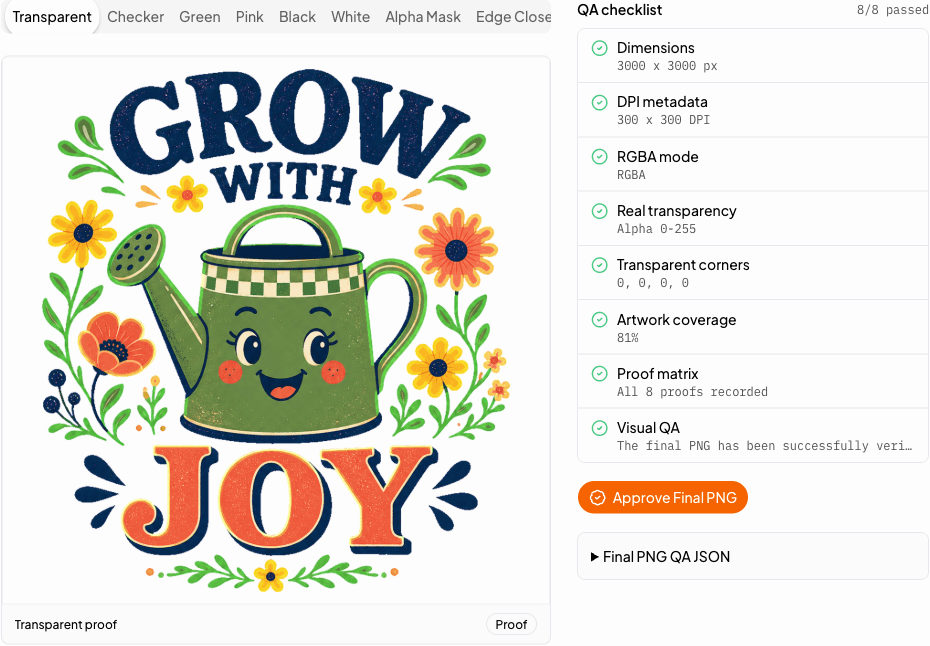
- Zoom in and read every word before selection.
- Check whether small details remain solid and readable on transparent canvas.
- Ask whether this product belongs in your shop and solves a buyer need.
- Do not select work you cannot lawfully sell.
Base every listing claim on the file in the ZIP
Once a design becomes a final PNG, Listsy treats the file as the source of production truth. Listing-image QA compares the gallery scenes with that PNG. The copy validator compares format and quantity claims with the package manifest.
This matters because a polished description can still be wrong. If the ZIP contains only a PNG, the description cannot call it an SVG, an editable Canva file, or a multi-file bundle.
| Known fact | Where it is used | Guardrail |
|---|---|---|
| 3000 by 3000 pixels | Buyer file QA and product description | Reject a mismatched extracted PNG |
| RGBA with transparency | Buyer file QA and format claims | Reject a flattened or opaque buyer file |
| One PNG in the package | Description and included-files image | Reject unsupported bundle and format claims |
| Selected design and exact text | Listing-image composition | Use the approved PNG as the scene source and check for missing, duplicated, or altered artwork |
A finished design does not prove there is demand
Listsy can produce and check artifacts. It cannot tell you that a niche has room for another product, that a keyword has low competition, or that Etsy will accept and rank a listing.
Use the generator after you have a product direction, not as a substitute for customer knowledge. The strongest brief comes from understanding what a buyer needs and how your shop can answer it honestly.
Practical questions
Sources checked
Policy and marketplace details can change. These are the pages used for this review. Check Etsy directly before making a listing decision.